KickDrum
High Precision Kick VST / AU Plugin
High Precision Kick VST / AU Plugin
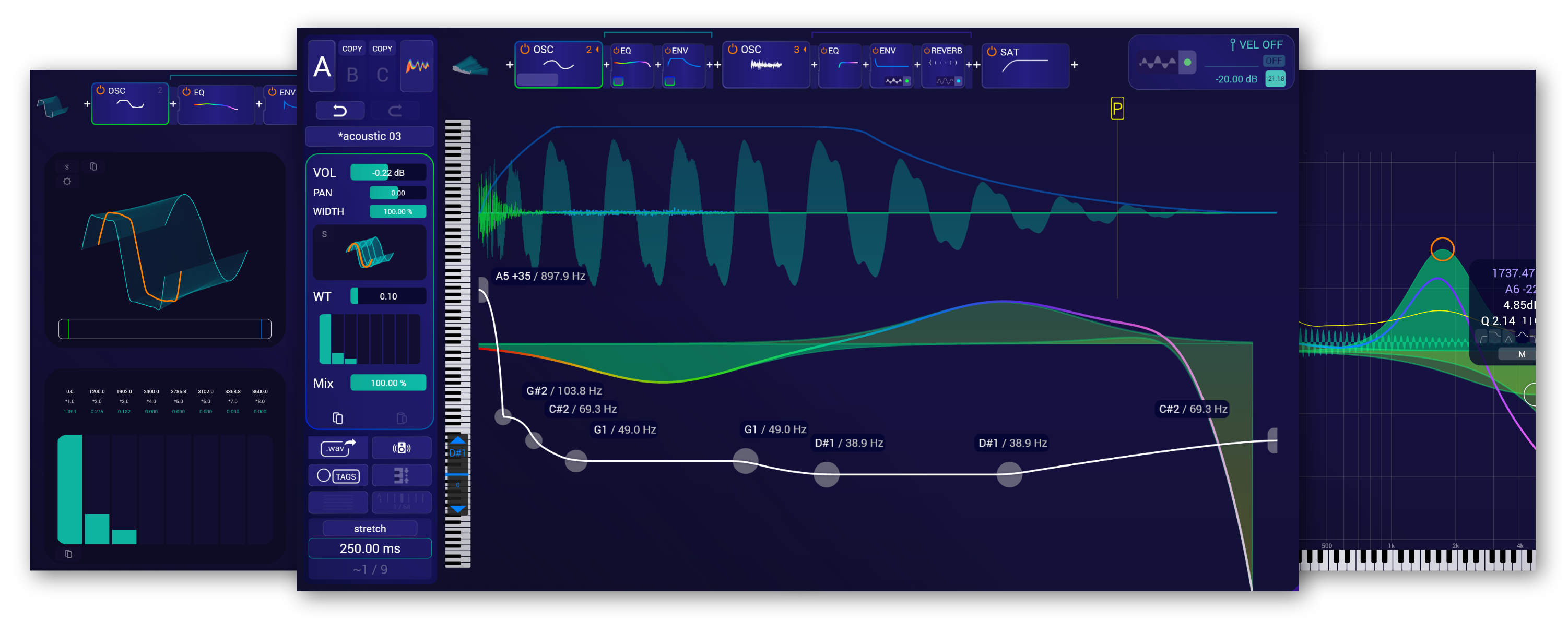
A dancefloor kick is basically a sine wave sweeping from a high pitch to a low pitch. But when it comes to shaping the pitch curve and timbres, introducing harmonics, EQing, layering samples, or applying effects, a dimension of endless creative possibilities opens. KickDrum is a modular kick synth plugin created to achieve maximum precision and sound quality with an intuitive workflow while exploring this dimension, aiming to reach the desired sound quickly.
Integrated Sample Analyze Function
Modular Kick Plugin Architecture
3D-editable Wavetable with Wave Designer & advanced Harmonic Editor
Easy and precise Bézier Curve shaping
Full signal look ahead 64-bit Audio Engine
Analyze Function
KickDrum's Analyze Function turns a Sample into a fully editable patch with reconstructed pitch and gain envelopes along with texture and optional wavetable creation.
drag and drop a sample or a full song onto the plugin,
or select it from the sampler's integrated sample browser
select your range of interest or analyze right away
the resulting patch is a functional replica of the original sample, ready for manipulation as a native VST / AU patch
3D-Editable Wavetable
Design your own custom waveforms with integrated per-wave modular chains. Arrange them inside the wavetable and morph between them to create your sound.
click + and enter the wave design mode
draw a custom shape with Bezier curves or select a timbre from an existing sample, or combine both
further process it with other modules, such as the linear phase EQ, saturation, etc.
finally pick your wave with the wave selector, with optional symmetry, blend & normalization
creating your own sound exactly the way you want has never been easier

Modular Device Chain
Construct your signal path with a reorderable chain of processing devices, offering a high degree of routing flexibility.
Devices
click + on the device chain and add devices from the menu
freely arrange and nest them inside of each other to create custom signal paths
enjoy a high degree of flexibility
Signal Path
Keep full control over every stage with the device's solo and oscillogram options.
click the "s" on a device to solo it and its sub-devices to listen to individual sections
each device has its own oscillogram that can be toggled and adjusted in transparency, color, and drawing mode
edit the pitch curve while seeing live spectrum changes from the EQ.
the device's control shine-through lets you select one device while the controls of another stay visible
the device's control shine-through lets you select one device while the controls of another stay visible
Linear Phase Equalizer
KickDrum's unique approach offers linear phase equalizing without causing playback latency, ensuring perfect phase alignment.
double-click on the spectrum to create a filter band
adjust gain, frequency, filter type, dB/octave by dragging up/down
or mask multiple bands and adjust them simultaneously
add as many bands as you like
or mark a band and click on the frequency keyboard to set a band to a key on the keyboard
shape harmonics, refine overtones, and balance your sound while maintaining the phase
Audio Engine
KickDrum's audio engine processes individual device stages from start to end before moving to the next layer. In contrast to conventional synthesizers that produce audio block-wise within a given time budget, KickDrum renders the audio on a non-DSP thread and fades the fully rendered sample into the live-output. This way, KickDrum can perform computationally expensive processing without exceeding the DSP thread's time budget. This approach is great for sounds that don't change over time, such as kick and snare in most EDM genres. Think of a sampler that, every time you make an edit, rebuilds the sample from scratch — enabling high-quality processing in a non-destructive workflow. This novel approach allows for some unique features, such as an in-time pinnable zero crossing, linear-phase equalizing without playback latency, steady master out, and negative pre-delay in the reverb
Adjustable Phase Zero Crossing
Does your kick need a zero crossing exactly at the 1/16 grid mark in your track to transition perfectly into your bass?
drag the Oscillator Phase Adjuster and place it where you need a fixed zero crossing
the oscillation will start from this point forward and backward in time, guaranteeing that this zero crossing is maintained and that the phase of your signal stays exactly where you need it
maintain a controlled, guaranteed transition into your bass
Auto Gain
Set the desired amplitude and KickDrum will adhere to that limit, keeping the output exact.
no matter what you do to the signal, its max amplitude is what you set it to
it's not a conventional limiter applying a varying gain envelope, but rather knowing the signal's maximum right away and multiplying each signal's sample by the correct compensation factor
this keeps the balance within your sound as you designed it while guaranteeing a controlled peak at the output
how it sounds
Sampler
Use the Sample Device to interact with your audio files, featuring seamless integration and a dedicated sample browser.
Switch in Place
click the folder icon to open the flyout-Sample Browser to browse folders and samples or whole songs on your hard drive
use the up/down arrow to cycle through samples and audition directly how they add up to your current sound
quickly find the best match
Sample Handling
Edit Samples directly in KickDrum
drag the sample left and right in the timeline
use the Envelope to shape its Gain curve
grab the vertical edge handlers to stretch or truncate
Preset Management
KickDrum offers a comprehensive Preset Browser allowing you to browse, save, and sort your kicks by name, key, or tag.
click on the upper-left Audija logo to open the preset browser
browse through actual folders with actual presets on your hard drive
save / rename / copy presets
add folders / delete folders
sort them by name, author, tags, date, or key
search folders and subfolders for keywords: "D#" lists all kicks in this key
Remote Preset Control: cycle through presets in a given folder or save changes to a preset - all right from the workspace without the need to open the preset browser
Curve Shaping
Bézier Curves with two axes moveable gravity points and adjustable feathering for precise pitch and gain envelope shaping.
double click to add a node or double click on a node to delete it
click and drag on curve to shape it on two axes
pull a mask around multiple nodes to scale and move them freely
right click and drag on the feather to smooth a node connection
switch between logarithmic and linear editing
precise curve editing made easy
Navigation
Dive deep into aspects of your sound with precise sample-level navigation.
right-click and drag on the oscillogram, the pitch envelopes keyboard, the vertical dB scale, or the EQ's spectrum to zoom into details
use right mouse double-click to reset a viewport
fast micro-adjustments with a User Interface that aids the process
WAV Export & Import
the wav export lets you convert your workspace directly into a .wav file you can drag from the Plugin UI into your DAW or into your operating system's file-browser.
to add one into your workspace use the integrated sample browser or drag and drop audio files directly onto the Plugin UI
Full Feature List
Core Architecture
Modular Nestable Device Architecture with copy/paste across devices and presets
Full look ahead 64-bit floating point Audio Engine
Internal automation system for all parameters
High Precision Kick VST / AU Plugin compatible with: Ableton, Bitwig, Studio One, Cubase, FL Studio, Reaper
Devices
OSC: Wavetable Oscillator with harmonic distortion, phase control, and a dedicated wave-editing mode
SAMPLE: Sampler for trimming, moving, stretching, and phase-inverting .wav/.aiff files
EQ: Linear-phase equalizer with unlimited bands and multiple filter types with slopes up to 96dB/octave (lowpass, shelf, bell, notch, highpass)
ENV: Gain envelope for precise volume shaping
SAT: Tanh-based saturator for mild saturation up to heavy overdrive
CLIP: Clipper ranging from soft to hard clipping
PITCH: Spectral pitch device for detailed frequency-domain pitch shifting
DISTORT: Wavetable-based distortion, allowing the creation and editing of distortion curves similar to OSC wavetable editing
Sound Design & Editing
Wavetable Editing: Dedicated wave-edit mode in the OSC's wavetable, including per wave device chains to sculpt custom waveforms
Analyze Function: converts a sample into an editable patch (OSC/ENV or OSC/EQ/ENV + SAMPLE/EQ) - with optional Wavetable creation
Bézier Curve Features: Freely movable Bézier points between nodes, optional logarithmic time spacing, and the ability to lasso multiple nodes to smooth transitions, fine-tune positions, and snap to key
Workflow & Utilities
Compare States: Three compare slots (A, B, C) let you copy and switch between states to compare iterations
Preset Management: Load, save, and update presets with the preset manager. Organize by folders and search by name, author, tags, key, date, or length. Cycle through presets and update them directly from the main menu
Undo & Redo
Fast, easy, and unbounded vertical and horizontal zoom
32-bit drag-and-drop WAV export
Visuals & Metering
Signal path visualization with customizable oscillograms (color, transparency, line/filled view)
Togglable and freely spaced grid lines
OSC pitch node tags (key, Hz, ms) can be toggled or resized
Togglable decibel scale
Accurate sample-level navigation for oscillogram, pitch keyboard, and EQ spectrogram
Length & Output
Length can be specified in milliseconds or tempo-relative (e.g. 1/4, 1/8, 1/16 etc.)
AutoGain maintains peak level at a specified dB
ADSR: Dedicated Note Envelope with Attack, Decay, Sustain & Release
Velocity sensitivity allows note velocity to affect output gain
Audija KickDrum
High Precision Kick VST / AU Plugin
Your purchase includes a lifetime license and all future updates.
Your purchase includes a lifetime license and all future updates.
€44,00
License & Setup
Install and use on up to 5 computers.
Internet only needed once to purchase and download the Setup & License.
No system impact, no calling home.
After purchase, you'll be able to download the setup and your personalized license via your User Account. From here, no internet connection is needed on your studio computer to activate or use the plugin. One license permits you to activate the software on up to 5 computers you or your business owns. Our licensing & Setup aim to respect your privacy and your computer's integrity.
Updates
Lifetime free updates — you will get free updates for as long as this plugin is shipped
Minimum system requirements
150 MB of free RAM
150 MB free hard drive storage
3 GHz quad core
Apple Mac (Intel x86_64 / Apple Silicon arm64) with macOS 10.15+ and AUv2 or VST3 compatible DAW
Microsoft Windows PC (x64) with VST3 compatible DAW
High Precision Kick VST / AU Plugin compatible with: Ableton, Bitwig, Studio One, Cubase, FL Studio, Reaper